
Digital Eye Strain: Why Your Eyes Hurt After Screen Time (And What to Do)
Headaches, blurry vision, and tired eyes after a day at your computer are not inevitable. Here is what causes digital eye strain and how to actually fix it.

Digital Eye Strain: Why Your Eyes Hurt After Screen Time (And What to Do)
If you spend several hours a day looking at screens — and most of us do — you've probably experienced digital eye strain. Tired eyes, headaches, blurry vision, neck pain, and difficulty focusing after a long day at your computer are so common that many people assume they're just part of modern life.
They don't have to be.
Digital eye strain (also called Computer Vision Syndrome) is a real, diagnosable condition with identifiable causes and effective solutions. Here's what's actually happening to your eyes — and what you can do about it.
What Is Digital Eye Strain?
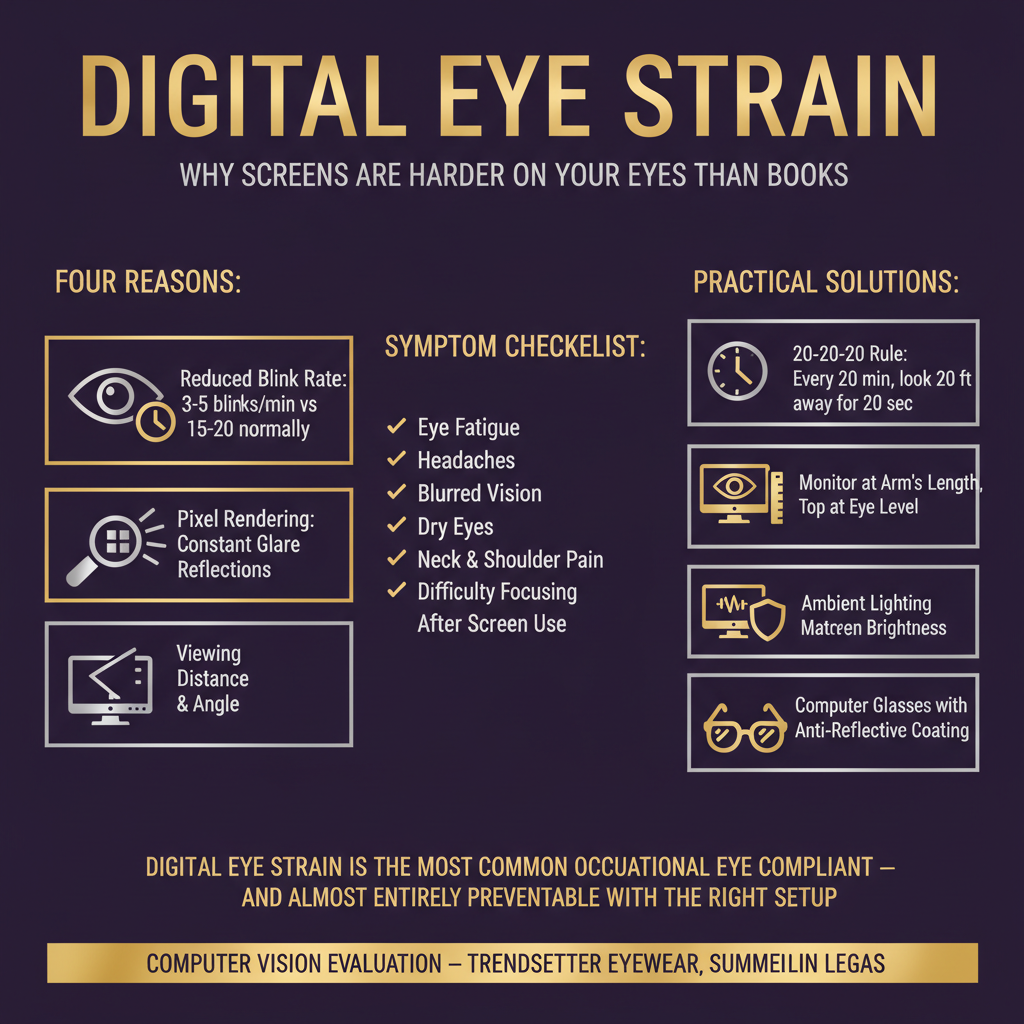
Digital eye strain is the most common occupational eye complaint — and almost entirely preventable with the right setup. The 20-20-20 rule helps, but monitor position, lighting, and the right prescription matter just as much.
Digital eye strain is a group of eye and vision-related problems that result from prolonged use of digital screens — computers, tablets, smartphones, and e-readers. The American Optometric Association estimates that 50–90% of people who work at computers experience some degree of digital eye strain.
It's not just about screen time quantity. The quality of the visual task matters enormously. Reading on a screen is significantly more demanding on the visual system than reading print, for several reasons.
Why Screens Are Hard on Your Eyes
Reduced Blink Rate
This is the single biggest factor. When we're focused on a screen, we blink up to 60% less than normal. Blinking is how your eyes refresh the tear film that keeps the corneal surface lubricated and clear. Less blinking means faster tear evaporation, leading to dry, irritated eyes and blurry vision.
Accommodative Demand
Your eyes have to continuously adjust focus (accommodate) as you shift your gaze between the screen, documents, keyboard, and other objects. This constant focusing and refocusing fatigues the ciliary muscles inside your eye — the same muscles that control your lens for near focus.
Convergence Demand
When you look at something close, your eyes have to turn inward (converge) to maintain single vision. Sustained convergence demand — staring at a screen for hours — fatigues the extraocular muscles and can worsen underlying binocular vision problems.
Screen Characteristics
Screens have characteristics that make them harder to read than print:
- Pixelation: Screen images are made of pixels, not continuous lines, which requires more visual effort to resolve
- Glare and reflections: Screen glare forces your eyes to work harder
- Contrast and brightness: Poorly calibrated screens increase visual fatigue
- Viewing distance and angle: Most people don't have their screens positioned optimally
Symptoms of Digital Eye Strain
- Eyestrain and eye fatigue
- Headaches (often at the temples or behind the eyes)
- Blurry or double vision
- Dry, irritated, or burning eyes
- Neck, shoulder, and back pain
- Difficulty focusing after screen use
- Increased sensitivity to light
- Difficulty concentrating
If you experience these symptoms regularly after screen use, you have digital eye strain. The question is: what's driving it for you specifically?
The Role of an Uncorrected or Incorrect Prescription
One of the most common and most overlooked causes of digital eye strain is a vision prescription that isn't quite right for your working distance.
Your distance prescription may be perfect for driving but slightly off for the 20–24 inches where your monitor sits. Even small refractive errors that don't cause problems at distance can create significant strain at near.
This is especially true for:
Presbyopia (age-related near vision loss): If you're over 40 and starting to need reading glasses, trying to compensate without them — or with the wrong prescription — is a major source of eye strain.
Uncorrected astigmatism: Small amounts of astigmatism that don't significantly affect distance vision can cause significant fatigue at near.
Binocular vision problems: Subtle misalignments that the visual system compensates for at distance may break down under the sustained convergence demand of screen work.
The 20-20-20 Rule: Helpful, But Not a Complete Solution
You've probably heard of the 20-20-20 rule: every 20 minutes, look at something 20 feet away for 20 seconds. This is good advice — it gives your accommodative and convergence systems a brief rest and encourages blinking.
But it's a management strategy, not a solution. If your eye strain is driven by an incorrect prescription, dry eye, or binocular vision dysfunction, the 20-20-20 rule will reduce symptoms but won't eliminate them.
Practical Steps to Reduce Digital Eye Strain
Optimize Your Workspace
Monitor position: Your screen should be 20–28 inches from your eyes, with the top of the screen at or slightly below eye level. Looking slightly downward is more comfortable than looking straight ahead or upward.
Reduce glare: Position your monitor to avoid reflections from windows or overhead lights. An anti-glare screen filter can help significantly.
Adjust brightness and contrast: Your screen brightness should roughly match the brightness of your environment. High contrast between a bright screen and a dark room is particularly fatiguing.
Increase text size: If you're squinting or leaning forward to read, your text is too small.
Blink More Consciously
Remind yourself to blink fully and regularly. Post a note near your monitor if needed. Consider using a blink reminder app. This sounds trivial but makes a real difference.
Use Artificial Tears
Preservative-free artificial tears used throughout the day can help maintain tear film stability during extended screen sessions. If you're using drops more than 4 times a day without relief, you may have underlying dry eye disease that needs proper treatment.
Take Real Breaks
The 20-20-20 rule is a minimum. Ideally, take a 5-minute break away from your screen every hour. Stand up, walk around, look out a window. Your eyes, neck, and back will all thank you.
Consider Computer Glasses
If you wear progressive lenses, the intermediate zone (for computer distance) may be narrow and require you to hold your head in an uncomfortable position. Single-vision computer glasses optimized for your working distance can be dramatically more comfortable for extended screen work.
Anti-reflective coating is essential for any glasses used at a computer — it reduces glare and reflections significantly.
When to See an Eye Doctor
You should schedule an eye exam if:
- Your symptoms are affecting your productivity or quality of life
- You haven't had an eye exam in the past year
- You're over 40 and haven't been evaluated for presbyopia
- Symptoms persist even after implementing the ergonomic changes above
- You experience headaches, dizziness, or double vision alongside eye strain
Digital eye strain is often a signal that something in your visual system needs attention — whether that's an updated prescription, treatment for dry eye, or evaluation for binocular vision dysfunction.
We Can Help
At Trendsetter Eyewear, we see many patients whose digital eye strain has a specific, treatable cause. Dr. Payne will take the time to identify what's actually driving your symptoms — not just hand you a generic solution.
Schedule an eye exam and let's figure out why your eyes are struggling with screens — and what will actually help.
Related reading:
- Comprehensive eye exams in Summerlin — includes digital eye strain and binocular vision assessment
- Dry eye and screen time — how screens damage your tear film
- NeuroVisual Medicine & BVD — when eye strain is caused by subtle eye misalignment
- Blue light lenses: do they work? — the evidence reviewed
Explore Topics
Written by
Dr. Cynthia Payne, OD
Content creator and writer sharing insights and stories.


